Tom Lionne
Tool reviews
9 min read
SEOSpace review: the Squarespace SEO plugin, pricing and AI visibility
SEOSpace review: the SEO plugin built for Squarespace, with a Chrome extension, page-by-page audits, AI writing and ChatGPT visibility tracking. Free for 50 pages, Starter from $18.99 a month.
Squarespace builds beautiful websites, and it builds them fast. Search optimisation is another story: default page titles, images with no alt text, blog post URLs that repeat the whole headline, pages competing for the same keyword. The settings are all there, but they are scattered across the editor, and nothing tells you where to start. SEOSpace fills that gap. It is an SEO tool built only for Squarespace: it scans every page, tells you what to fix and in what order, and shows its advice right inside the Squarespace editor, through a Chrome extension.
This page contains affiliate links: if you subscribe to SEOSpace through them, I earn a commission, and you pay the same price.
Here is what the tool does, what each plan costs and who it is for.
- An SEO plugin designed for Squarespace websites, and only for them.
- A Chrome extension that shows each page’s score and fixes, inside the Squarespace editor.
- A dashboard with a full site audit, keyword rank tracking and AI writing tools.
- AI visibility tracking across ChatGPT, Perplexity, Gemini and Copilot.
- A free plan for 50 pages, then Starter at $18.99 a month, or $151.92 a year.
What is SEOSpace?
SEOSpace is a Squarespace SEO plugin. People often ask whether there is a Yoast for Squarespace: Yoast only runs on WordPress, and SEOSpace is the tool that plays that role on Squarespace. Because Squarespace does not accept plugins the way WordPress does, SEOSpace works through two doors: a Chrome extension that sits on top of the editor or the live page, and an online dashboard that holds the site audit, keyword tracking and AI tools.
The company reports more than 35,000 Squarespace users and over 20,000 installs of its extension. It serves three kinds of people: site owners who have never done SEO, web designers who build Squarespace sites for clients, and agencies that manage dozens of them.
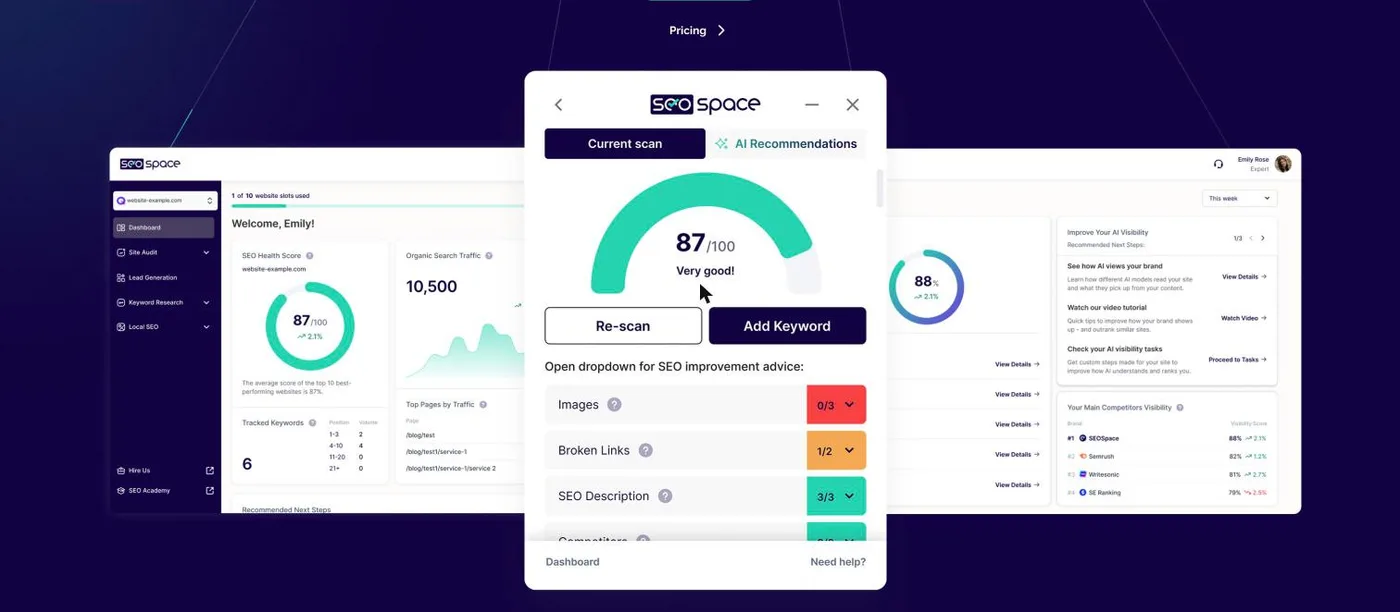
How SEOSpace works
Getting started takes a few steps. You create an account, add your site’s address, remove any pages you want skipped, and the full audit runs in a few minutes. You can then connect Google Search Console, which sharpens the recommendations with your site’s real search queries.
The work then happens page by page, from the extension. Opened in the Squarespace editor, it shows a score out of 100 and a list of things to fix: image alt text, broken links, page description, title, heading structure, page URL. Each point comes with a plain-English explanation and the exact place where the setting lives in Squarespace. For a title or a description, the AI suggests wording you can simply copy over. You fix, you re-scan, the score goes up.
One detail that matters to web designers: the extension also scans draft pages and password-protected sites. SEO gets done while the site is being built, not as an afterthought once it is live.
SEOSpace features
Site audit and page scores
The automatic audit covers the whole site, from 100 pages on Starter to unlimited pages on Expert. The dashboard turns it into an SEO health score, a priority list of pages to work on, and a history over time. Scheduled reports arrive monthly on Starter and weekly on Pro.
Keyword rank tracking
SEOSpace tracks your Google rankings for a list of keywords: 25 on Starter, 100 on Pro, 500 on Expert. Week after week you see whether your fixes pay off and which pages are climbing.
AI writing help
AI credits go towards page titles and descriptions, product descriptions, blog ideas and full blog posts, keyword research and competitor analysis. The allowance depends on the plan: 50 credits a month on Starter, 200 on Pro, 500 on Expert.
AI visibility: ChatGPT, Perplexity and Gemini
This is the newest feature. SEOSpace measures how often your site appears in answers from AI assistants (ChatGPT, Perplexity, Gemini, DeepSeek, Copilot) and compares it with your competitors, topic by topic. It then gives you a task list to show up more often in those answers: content, metadata, page structure. For a small business watching its clicks slip since AI answers arrived in Google, it is a concrete place to start.

Local SEO tools
SEOSpace Local adds a map rank tracker that shows where you rank street by street, Google review management, Google Business Profile updates and posts, and step-by-step local tasks. It covers up to three Business Profiles and 50 tracked local keywords. It is available in the United States, the United Kingdom, Canada, Australia, Ireland and New Zealand, as an add-on from $29.99 a month or included in the Expert plan.
Client reports for designers and agencies
Designers and agencies get PDF reports, white-labelled from the first plan, and an embeddable audit tool to put on their own site and attract leads. The Reseller plan goes further: a fully white-labelled platform, a reseller dashboard, API access and unlimited client sites.
Orbit AI: the SEO work done every week
Orbit AI is an add-on that puts five AI agents on your site: keyword assist and cannibalisation checks, blog generation, local SEO, review replies and content strategy. At each audit, they spot what has slipped and write the fix. You get a finished queue of work to approve, edit or dismiss. Orbit costs $119 a month, or $952 a year, on top of your plan.
SEOSpace pricing
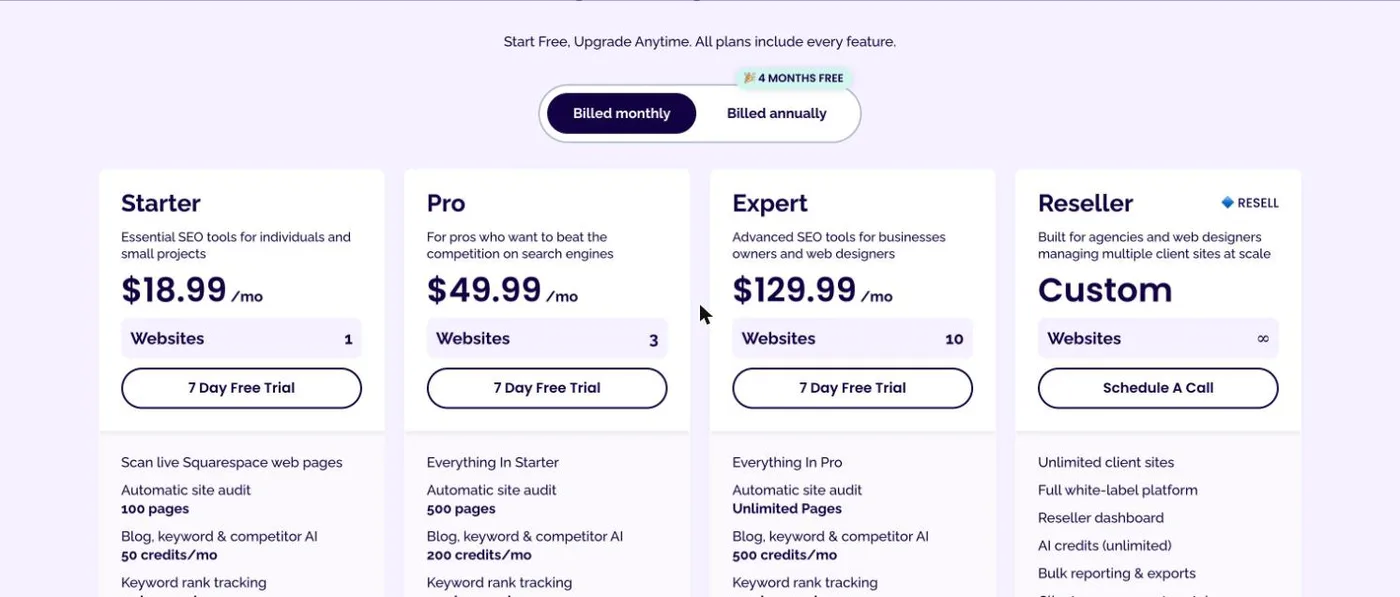
Every plan includes every feature: what changes from one plan to the next is the number of sites, the number of pages audited and the allowances (AI credits, tracked keywords). Paying yearly works out at eight months for the price of twelve.
| Plan | Monthly | Yearly | Sites | Pages audited | AI credits a month | Tracked keywords |
|---|---|---|---|---|---|---|
| Free | $0 | $0 | 1 | 50 | ||
| Starter | $18.99 | $151.92 | 1 | 100 | 50 | 25 |
| Pro | $49.99 | $399.92 | 3 | 500 | 200 | 100 |
| Expert | $129.99 | $1,039.92 | 10 | unlimited | 500 | 500 |
| Reseller | custom | custom | unlimited | unlimited | unlimited |
Pro and Expert accept extra users, at $10 and $15 per person per month. Expert adds a dedicated account manager, priority support and custom branding.
The easiest way to judge it: the free plan.
Chrome extension and a 50-page audit, no credit card. Paid plans come with a 7-day trial.
Is SEOSpace free? The free plan and the 7-day trial
Yes, to get started. The Free plan gives you the Chrome extension and a 50-page audit, with no credit card and no time limit. For a small brochure site, that is enough to fix the essentials. Each paid plan comes with a 7-day free trial, and you can cancel any time from the dashboard.
Starter, Pro or Expert: which plan to choose?
Starter suits the owner of a single site: a photographer, a craftsperson, a shop, a therapist. At $151.92 a year, under $13 a month, it covers the audit, 25 tracked keywords and everyday AI writing. Pro is for the web designer looking after three sites, or the site that publishes a lot and needs more AI credits. Expert is built for the agency or studio running up to ten sites, with unlimited pages audited and local SEO included. Beyond that, the Reseller plan is quoted on request.
Who is SEOSpace for?
Squarespace site owners new to SEO
This is the core audience. SEOSpace turns SEO into a task list, explained without jargon, with the exact setting to change in Squarespace. Nobody needs to know what a title tag is to fill one in properly.
Web designers who build on Squarespace
They can set up SEO during the build, on draft pages, and add an SEO service to their quotes, with PDF reports to back it up. Many site owners discover the tool through their designer.
Agencies managing several sites
Pro, Expert and Reseller give them several sites in one account, branded reports and, on Reseller, a whole platform under their own name.
SEOSpace strengths
- A tool built entirely around Squarespace, settings and vocabulary included.
- Advice shown inside the editor, page by page, right where the fix happens.
- Scans of draft pages and password-protected sites, before launch.
- A free plan with no credit card, then a low entry price.
- AI visibility tracking for ChatGPT, Perplexity and Gemini, included in the plans.
- Fast, friendly support by live chat and email, which users praise in their Google reviews, rated around 4.6 out of 5.
Things to know
- Squarespace only. For WordPress, Wix or Shopify, you need another tool.
- Chrome first. The extension runs on Google Chrome, with Safari and Firefox announced.
- Local SEO covers six countries. The local tools work in the US, the UK, Canada, Australia, Ireland and New Zealand. The rest of the tool works everywhere.
- Plans are priced by site count. An agency with many small sites will look at Expert or Reseller rather than stacking Starter plans.
SEOSpace vs the alternatives
| Tool | Works with | Best at |
|---|---|---|
| SEOSpace | Squarespace | Page-by-page advice inside the editor, for beginners and designers |
| Squarespace’s built-in SEO settings | Squarespace | The basic fields (title, description, URL), with no analysis or priorities |
| Yoast SEO | WordPress only | On-page guidance for WordPress sites |
| Alli AI | Any CMS, Squarespace included | On-page fixes applied in bulk across thousands of pages |
| Semrush | Any site | Keyword research, competitor analysis and link building at scale |
Squarespace’s built-in settings are enough to fill in a title and a description, but they do not tell you which ones are missing or where to begin: SEOSpace adds exactly that layer. That is also the answer to « SEOSpace vs Yoast »: Yoast does the same job, but only on WordPress. For a Squarespace site, SEOSpace is the most direct option. People who run sites on several platforms will look at Alli AI, and those who want a complete SEO toolbox at Semrush. You can also browse all my tool reviews.
SEOSpace FAQ
How much does SEOSpace cost?
The Free plan costs nothing. Starter is $18.99 a month or $151.92 a year, Pro $49.99 a month or $399.92 a year, Expert $129.99 a month or $1,039.92 a year. Reseller is quoted on request.
Is there a Yoast for Squarespace?
Yoast only works on WordPress. On Squarespace, SEOSpace plays that role: it scans each page and tells you which settings to change in the editor.
Is SEOSpace a real Squarespace plugin?
Squarespace does not run third-party plugins inside the site. SEOSpace works as a Chrome extension on top of the editor, plus an online dashboard, so nothing is installed on the site itself.
Do I need coding skills to use SEOSpace?
No. Every fix is made in Squarespace’s own settings, without a line of code, by following the extension’s guidance.
Can I cancel SEOSpace at any time?
Yes, from the dashboard, with no special process.
My verdict on SEOSpace
SEOSpace answers the question every Squarespace site owner eventually asks: what should I change, and in what order, to be found on Google? It answers page by page, inside the editor, with clear explanations and an AI that writes your titles for you. The free plan lets you fix a small site without paying anything, and Starter, under $13 a month on yearly billing, easily covers a brochure site or an online shop. AI visibility tracking for ChatGPT and Perplexity, included as standard, also makes it one of the most up-to-date tools in its category. For a Squarespace site, it is the SEO tool to install first.
Start with the free plan on your site, fix the pages that show up in red, then move to Starter if you want to track rankings and write with AI.
Want to know what is holding your Squarespace site back on Google?
Free 50-page audit, Chrome extension and page-by-page advice, no credit card.
The SEOSpace links on this page are affiliate links: if you subscribe through them, I earn a commission, and you pay the same price. My opinion remains my own.