Tom Lionne
Tool reviews
11 min read
Surfer SEO review: pricing, Content Editor and AI visibility of the content optimisation tool
Surfer SEO review: a Content Editor scored in real time, Topical Map, page audits and brand tracking in ChatGPT and Gemini. Discovery plan from $49 a month billed yearly.
Writing an article that ranks on Google means knowing what the top pages have in common: their length, their headings, the terms they use, the questions they answer. And now that ChatGPT, Gemini and the AI Overviews answer in place of search engines, you also need to know whether your brand gets cited. Surfer, long known as Surfer SEO, does both. Its editor guides you word by word as you write, and its platform tracks your presence in AI answers. More than 150,000 customers in 159 countries use it.
This page contains affiliate links: if you subscribe to Surfer through them, I earn a commission, and you pay the same price.
Here is what the tool does, what each plan costs and who it is for.
- A content optimisation tool for Google and for AI search.
- An editor that scores your text out of 100 in real time and lists the terms to use.
- Brand tracking in ChatGPT, Perplexity, Gemini, AI Mode and the AI Overviews.
- Content optimised in any language, for any country.
- A Discovery plan from $49 a month billed yearly, and several free tools.
What is Surfer SEO?
Surfer is a content optimisation platform. For a given keyword, it analyses the top-ranking pages and turns them into precise guidelines: word count, number of headings and paragraphs, terms and topics to cover, questions to answer. You write in its editor, and a score tells you live whether your text measures up to the competition.
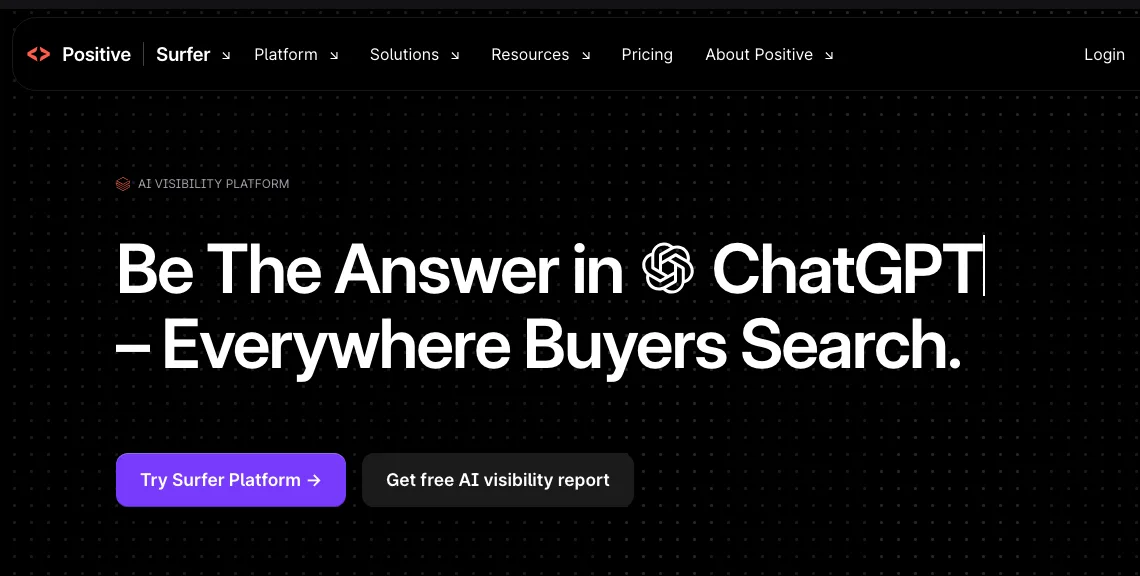
Founded in Wrocław, Poland, the tool is now part of Positive, a European software group. Its positioning has followed the way search has changed: the editor that made it famous has been joined by content planning, an audit of published pages and, more recently, visibility tracking in AI answers. Surfer now presents itself as a visibility platform, for Google and for generated answers alike.
The Content Editor, the heart of Surfer
This is the tool that built Surfer’s reputation. You enter your keyword, and the editor prepares a writing space with every guideline drawn from competing pages on the right. In the middle, the Content Score, a grade out of 100, rises as your text covers the right terms and takes the right structure. You also see the competitors’ average and the best score on the results page.
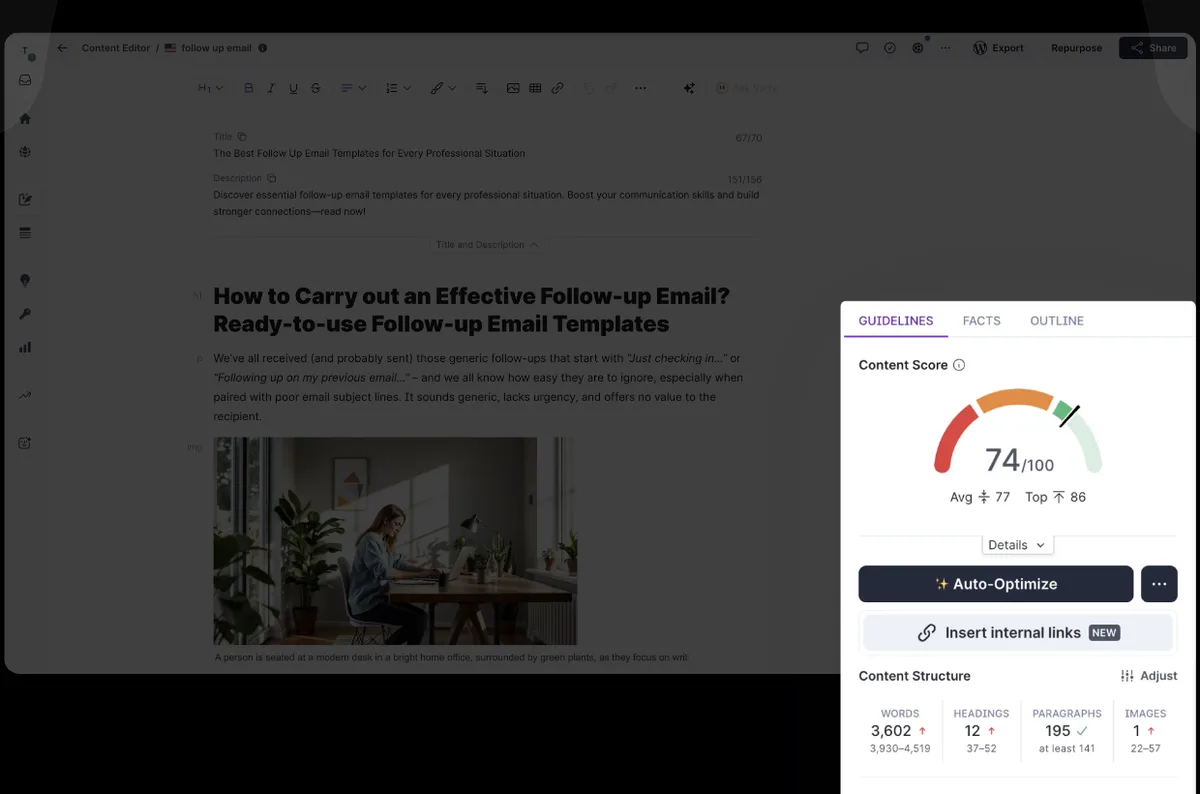
Each suggested term comes with a usage range, and turns green once you have placed it. An outline builder suggests headings and questions before you write the first line. The editor works in every language and for every country, so it serves an English blog as well as a site in Spanish, German or French.
Several features save a great deal of time:
- Auto-Optimize adds the missing terms and sections in one click, while keeping a natural tone.
- Automatic internal links crawl your site, pick the anchor and insert links to your other pages.
- Surfy, the writing assistant, rephrases, expands or illustrates a passage, and can write in your own voice thanks to custom voices.
- The plagiarism checker verifies the text before publication.
You can share the editor with an outside writer through a simple link, without giving them access to your account. It also works inside Google Docs, Contentful and WordPress, whose plugin now carries the full editor, with one-click export and image import into your media library.
AI writing, Humanizer and AI detector
Surfer can also write for you. Its AI writing feature runs the research, writes the article and optimises it, then you review it before publishing. Templates cover commercial content such as product reviews and comparisons, and you can provide facts about your brand so they appear in the text.
The Humanizer reworks a text to give it a more natural tone, and the AI detector flags the passages that sound machine-written. Both are available for free on the website, and in a full version inside the subscription.
Surfer AI: visibility in ChatGPT, Gemini and the AI Overviews
This has been Surfer’s big project in recent months. The AI Tracker follows a list of questions, or prompts, that your customers ask AI assistants, and shows whether your brand appears in the answers of ChatGPT, Perplexity, Gemini, Google AI Mode and the AI Overviews. A single prompt is tracked across all five models at once.

The dashboard brings together your visibility score, your share of voice against competitors, the sentiment AI models use when they talk about you, and above all the sources they cite. The Mention Gap lists the prompts where competitors get cited and you do not: a ready-made list of content to write or sites to reach out to. Surfer records the answers as users see them, in each assistant’s real interface, with their links and citations.
Tracking ties in with the rest of the tool: the topical map to plan, the editor to write the missing content, the audit to keep it up to date.
Topical Map and keyword research: knowing what to write
Before writing, you need to pick your topics. The Topical Map groups the keywords of your niche into content clusters, shows what your site already covers and what it is missing, and suggests the best article ideas every week. Connected to Google Search Console, it starts from your real data. Any topic becomes a detailed article outline in one click.

Keyword research, SERP analysis and, on the Pro plan, the cannibalization report, which spots pages of your site competing for the same query, round out the planning side.
Content Audit: keeping published pages alive
A published article loses ground if it is never updated. The Content Audit tracks the position, click-through rate, traffic and Content Score of your pages every day. It alerts you when a page drops and finds quick wins every week: articles close to page one that an update can push higher.
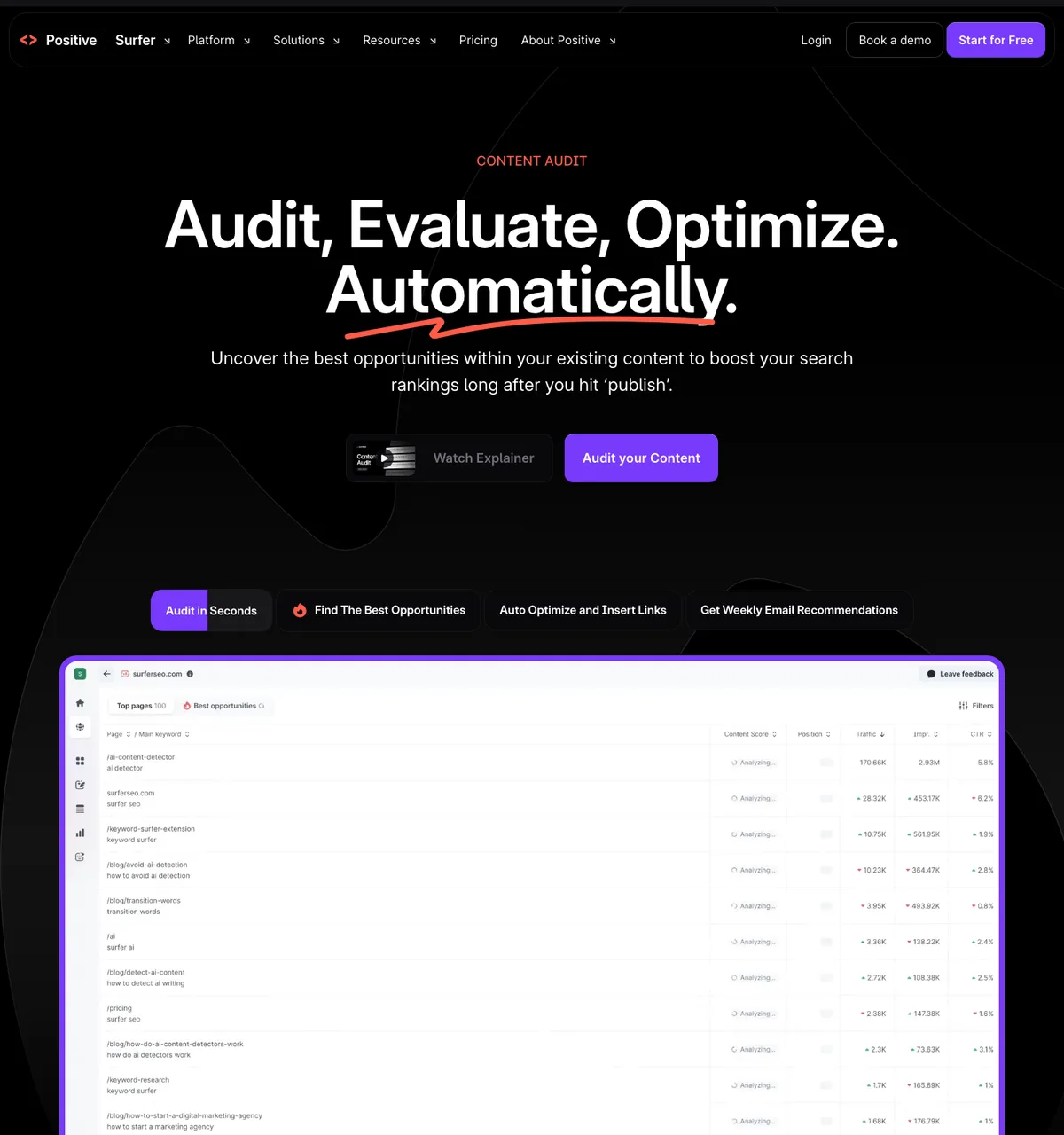
You then open the page in the editor and run Auto-Optimize to align it with what ranks today. It is one of the most profitable ways to use Surfer: you work on pages that already have authority.
Surfer SEO pricing
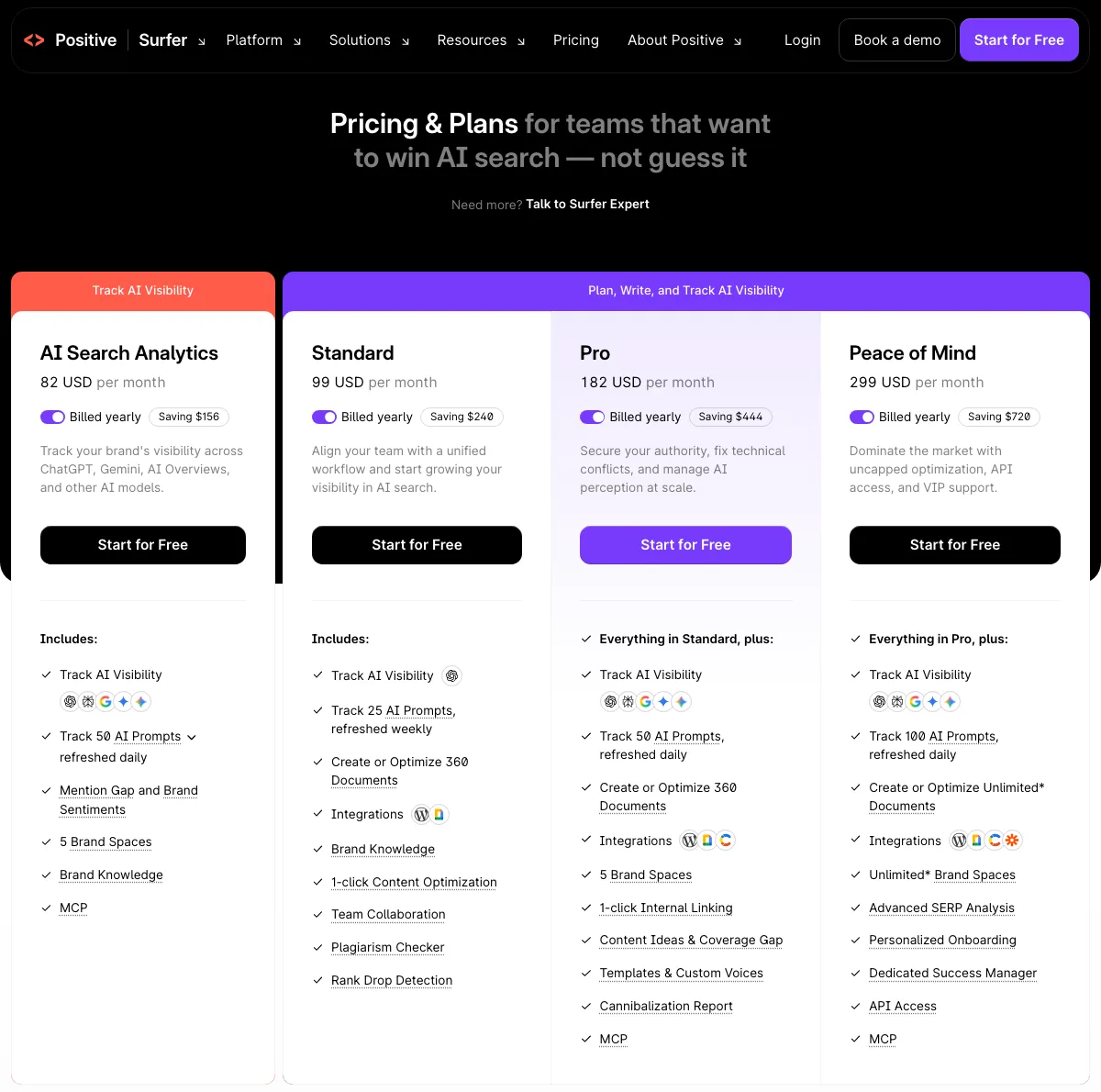
Surfer lists its prices in US dollars, per month, with up to 17% off on yearly billing. Every writing plan includes the editor, the Content Score, the Surfy assistant, the Humanizer, the AI detector and the plagiarism checker.
| Plan | Billed yearly | Billed monthly | Content to write or optimise | AI prompts tracked |
|---|---|---|---|---|
| Discovery | $49 a month | $59 a month | 120 | No AI tracking |
| Standard | $99 a month | $119 a month | 360 | 25, weekly, in ChatGPT |
| Pro | $182 a month | $219 a month | 360 | 50, daily, across the five models |
| Peace of Mind | $299 a month | $359 a month | Unlimited | 100, daily, across the five models |
| AI Search Analytics | $82 a month | $95 a month | AI tracking only | 50, daily, across the five models |
| Enterprise | Custom quote | Custom limits | Custom | |
Beyond volume, the plans differ in the number of pages tracked in the audit (10 on Discovery, 50 on Standard, 200 on Pro, 500 on Peace of Mind) and in team seats (1, 3, 5, then 10). Standard adds integrations, one-click optimisation, team collaboration and rank drop alerts. Pro adds automatic internal linking, content ideas, templates and custom voices, the cannibalization report and five brand spaces. Peace of Mind unlocks API access, personalised onboarding and a dedicated success manager.
Yearly billing is paid upfront, by card or bank transfer, and the content allowance renews every year. You can cancel at any time from your settings, and access stays open until the end of the paid period.
Want to see what Surfer suggests for your articles?
Create your account and explore the editor, the topical map and AI visibility tracking.
Is Surfer SEO free?
The editor and AI tracking require a subscription, but creating an account is free, and Surfer offers several tools at no cost:
- Keyword Surfer, the Chrome extension, shows search volume, cost per click and keyword ideas right inside Google’s results. It is Surfer’s most popular tool.
- The AI detector and the Humanizer can be tried freely on the website.
- The AI visibility audit tells you for free how AI assistants talk about your brand.
- Surfer Academy courses, including one on content optimisation and one on AI search, with a certificate at the end.
To start at a low price, the Discovery plan gives you the full editor for $49 a month billed yearly, or $59 month to month.
Which plan should you choose?
- Discovery if you write for one site yourself: 120 pieces of content to create or optimise, about ten a month, and tracking for your ten key pages.
- Standard if you work as a team, with WordPress or Google Docs, and want a first measure of your presence in ChatGPT.
- Pro if you manage several brands or a large site: daily tracking across the five models, automatic internal links and the cannibalization report.
- AI Search Analytics if you only want to track your brand in AI answers, without the editor.
Who is Surfer for?
Content writers and freelancers
Surfer gives every article an objective frame: you know what to cover and how far to go, and you deliver a text whose score speaks for itself. Many clients now ask their writers to work with it.
Agencies and content teams
Briefs generated in minutes, an editor shared by link, comments, version history and brand spaces: the tool lends itself to team production, with consistent quality from one writer to the next.
Publishers and bloggers
For anyone who lives off their traffic, the Content Audit and Auto-Optimize pair is a direct lever: you lift the pages that are slipping, and write new ones with the right benchmarks from the start.
Brands that want to be cited by AI
Tracking in ChatGPT, Gemini and Perplexity, with the list of cited sources, gives marketing and PR teams a concrete action plan.
Surfer’s strengths
- A benchmark editor: the Content Score makes optimisation visible and measurable, sentence after sentence.
- Google and AI in the same tool: you write, track your visibility and adjust without switching software.
- Real time savings: outlines, briefs, internal links and optimisation take a few clicks.
- Every language and every country, which makes it a natural fit for international sites.
- Useful integrations: WordPress, Google Docs, Contentful, Zapier and an API on the top plans.
Things to know
Surfer focuses on content: for backlinks and technical site audits, it pairs with an all-in-one toolkit such as Semrush. The Content Score is a guide, not an end in itself: aim for the competitors’ range rather than the maximum, and keep control of the tone and the experience you bring. Plans are capped in the number of pieces of content, apart from Peace of Mind. Finally, yearly billing is the best value but is paid upfront: the monthly plan lets you find your feet before committing.
Getting started with Surfer
- Connect Google Search Console so the topical map and the audit start from your real data.
- Start with the audit: optimise three or four pages close to page one before writing anything new.
- Install the WordPress plugin or the Google Docs add-on to write where you publish.
- Fill in your brand information so Surfy and AI writing reuse it.
- Add your first prompts to the AI Tracker to get a baseline of your visibility.
Surfer vs the alternatives
| Tool | Main strength | Best for |
|---|---|---|
| Surfer | Optimising every article and tracking visibility in AI answers | Writers, agencies and content teams |
| Semrush | Very complete keyword, competitor, backlink and audit data | Those who run their whole SEO |
| BabyLoveGrowth | Articles written and published on autopilot, with backlinks | Businesses without an SEO team |
| Alli AI | On-page SEO applied at scale and pre-rendering for AI crawlers | Agencies and sites on several CMSs |
Surfer and Semrush complement each other well: one to write, the other to analyse the market and links. Browse all my tool reviews to compare.
Surfer SEO FAQ
How much does Surfer SEO cost?
From $49 a month billed yearly for Discovery to $299 for Peace of Mind, or $59 to $359 on monthly billing. AI tracking alone costs $82 a month billed yearly.
Is Surfer SEO free?
The account is free, as are the Keyword Surfer extension, the AI detector, the Humanizer and the AI visibility audit. The editor is available from the Discovery plan.
What is the difference between Surfer and Semrush?
Surfer tells you how to write and improve each page. Semrush covers all of SEO: keywords, competitors, backlinks, technical audits and rank tracking.
Does Surfer work with WordPress?
Yes. The WordPress plugin carries the full editor, with live guidelines and one-click export.
Does Surfer work in other languages?
Yes. The editor optimises content in every language and for every country, and the app itself is also available in French.
Does Google penalise content optimised with Surfer?
Google judges how useful a page is. An article that covers its topic well, reviewed and enriched with your own experience, remains a good article, whatever tool helped write it.
My verdict on Surfer SEO
Surfer remains one of the best tools for writing content that ranks: its editor turns competitor analysis into clear guidelines, and the Content Score makes every improvement visible. With the topical map, the audit of published pages and tracking in ChatGPT, Gemini and the AI Overviews, it now covers the whole life of a piece of content, from the idea to the AI citation. For a writer, an agency or a publisher who publishes regularly, it is an investment that pays for itself quickly.
Start with the Discovery plan to get to grips with the editor, then move up to Standard or Pro when AI visibility becomes a priority.
Want to write articles that rank on Google and in AI answers?
Content Editor, topical map, audit and ChatGPT tracking, from $49 a month billed yearly.
The Surfer links on this page are affiliate links: if you subscribe through them, I earn a commission, and you pay the same price. My opinion remains my own.